 Download free theme
Free bilingual theme for ProPresenter worship slides
Download the VerseBridge theme pack with three variants: VB Bilingual, VB English, and VB Spanish. Built to pair with VerseBridge exports and easy to customize inside ProPresenter.
7-day free trial included (unlimited exports).
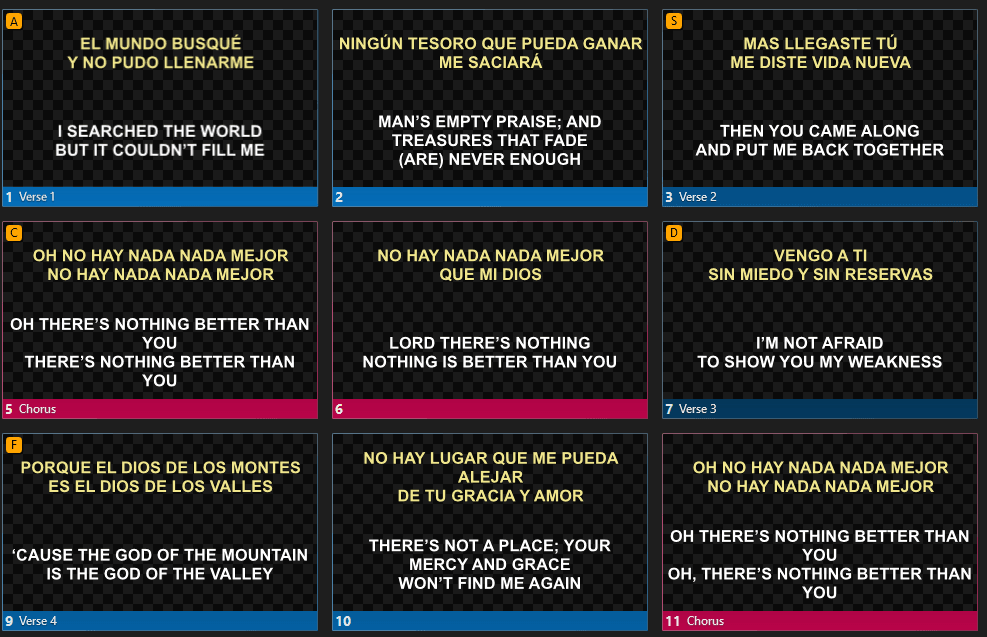
Building a bilingual theme from scratch is a time sink.
You duplicate a theme for every language.
Font sizes drift between slides.
Bilingual lines fight for space.
You tweak alignment every week.
Volunteers avoid touching the theme.
This theme pack makes bilingual slides feel intentional.
What is inside the pack
Download free themeVB Bilingual
Two-language layout
Balanced placement for English + Spanish on every slide.
VB English
Single-language clarity
A clean, centered layout for English-only sets.
VB Spanish
Spanish-first layout
A dedicated Spanish theme when you want one language on screen.
How to apply the theme
Step 1
Download the theme pack
Grab the free Gumroad download and unzip the theme files.
Step 2
Import into ProPresenter 7
Import the VB Bilingual, VB English, and VB Spanish themes once.
Step 3
Apply to VerseBridge exports
Open a VerseBridge .pro export and choose the variant you want to show.
Video walkthrough
See VerseBridge in action.
A guided tour of the editor workflow, alignment tools, and ProPresenter export setup.
Why teams use this theme
- Three ready-to-use variants for bilingual or single-language screens
- Built for two text boxes per slide from VerseBridge exports
- Designed for clear lyric readability in worship spaces
- Works with any ProPresenter 7 slide deck, not just VerseBridge
- Easy to customize fonts, colors, and placements in ProPresenter
Made for VerseBridge
VerseBridge exports drop right into this theme.
VerseBridge creates two text boxes per slide, so the bilingual layout stays clean.
Download, import, and apply the theme
1. Download the free pack
Download and unzip the files so the three included ProPresenter themes are available on your computer.
2. Import the theme
Add the theme file using ProPresenter's theme workflow. Menu wording varies by version, so use the current Renewed Vision guide if the controls differ.
3. Choose a layout
VB Bilingual is for two text boxes; VB English and VB Spanish are single-language variants. A theme styles and places text; lyric preparation determines the words and line breaks.
4. Apply and verify
Select the slides, apply the chosen theme through the available theme options, and check readability on the actual output before rehearsal.
FAQ
Is the theme pack free?
Yes. The Gumroad download is $0+, so you can grab it for free.
Does it work with ProPresenter 7?
Yes. It is built as a ProPresenter 7 theme pack.
Do I need VerseBridge to use it?
No. You can apply the theme to any ProPresenter 7 slides. VerseBridge exports are already formatted for it.
Can I customize fonts or colors?
Yes. Edit the theme inside ProPresenter to match your brand.
What is included?
Three variants: VB Bilingual, VB English, and VB Spanish.
Download the theme and get on with rehearsal
Free theme pack, ready for this weekend.