 Open Editor
Bilingual ProPresenter 7 slides for worship teams
Paste two languages, auto-align line-by-line, fix the weird spots once, and export a ProPresenter 7-ready .pro file that keeps your worship theme consistent.
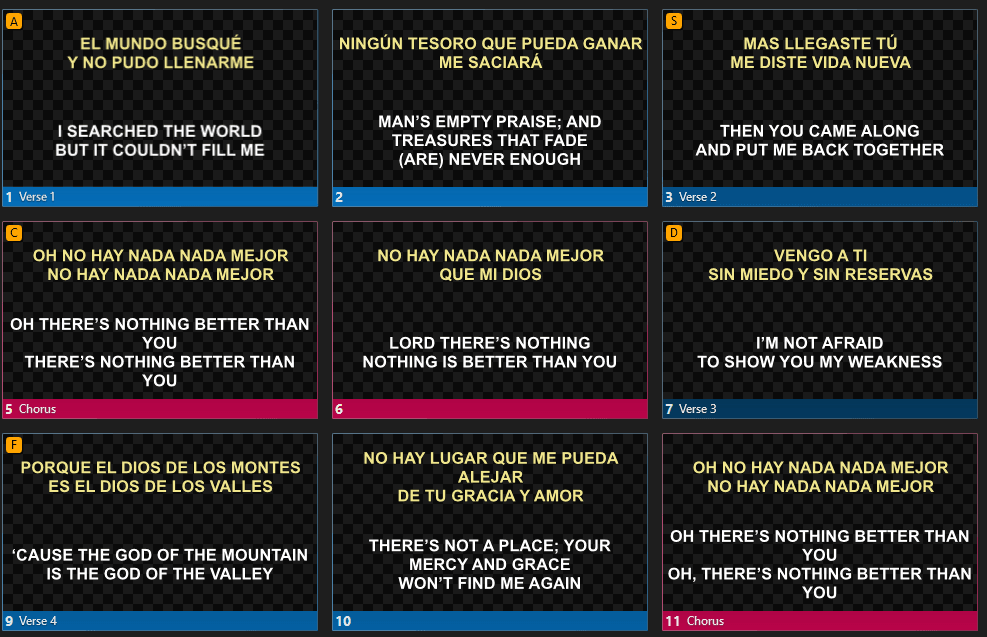
If you have ever built bilingual slides, you know the drill:
You paste English.
You manually add slide breaks.
You paste Spanish. One line at a time.
Oops. The lyrics don't match.
Now you're babysitting every slide break and spacing, again.
VerseBridge is built for the one part ProPresenter doesn't solve:
keeping two languages aligned, line by line.
How ProPresenter 7 bilingual slides work
Try it nowStep 1
Paste both languages
Drop in worship lyrics as plain text or ChordPro.
Step 2
Align line-by-line
VerseBridge auto-aligns by sections and highlights mismatches so you can correct them fast.
Step 3
Export to ProPresenter 7
Get a .pro file with two text boxes per slide (Language A + Language B), ready for your ProPresenter 7 theme.
Video walkthrough
See VerseBridge in action.
A guided tour of the editor workflow, alignment tools, and ProPresenter export setup.
Built for real-world bilingual lyrics (where translations may use different phrasing)
- Mismatch highlighting when one side has extra lines
- Quick fixes: insert spacer line, merge lines, move line up/down
- Section-aware alignment (Verse/Chorus/Bridge) so it doesn't drift
- Slide grouping control so you're not stuck with one-line slides
- Export options: ProPresenter .pro and PDF (two-column or alternating)
Alignment wins
Alignment is the product.
VerseBridge handles the line-by-line grunt work so your ProPresenter theme can do what it does best: look great.
Outputs you can trust
ProPresenter 7 .pro export
Slides that match your theme
VerseBridge exports two text boxes per slide, so your ProPresenter 7 theme controls fonts, colors, and placement. You keep your Sunday look consistent.
PDF export
Rehearsal-ready bilingual layout
Generate a clean PDF for band, vocalists, or printouts.
Perfect for...
Prepare bilingual slides and check them before rehearsal
1. Bring approved lyrics
Paste the English and Spanish text your team has permission to use. VerseBridge helps align supplied lyrics; it does not translate songs.
2. Keep sections matched
Label verse, chorus, and bridge consistently on both sides. Compare section order before adjusting individual lines.
3. Align for meaning
When one translation needs more words, split at a natural phrase boundary. Use a blank line or merge lines where that keeps both languages easy to follow.
4. Export and rehearse
Export the .pro file, import it into ProPresenter, apply your presentation theme, then check the first and last slide of each section and rehearse every transition.
Start with a 7-day free trial
The trial includes unlimited exports. After it ends, the free plan includes one export per month; upgrade for unlimited exports when your team needs them.
FAQ
Does VerseBridge integrate directly with ProPresenter?
No plugin needed. You export a .pro file and open it in ProPresenter.
Will it mess up my ProPresenter theme?
No. The export is designed so your theme controls styling.
What if Spanish doesn't match English line-for-line?
That's the point. VerseBridge flags mismatches and gives quick tools (spacers, merge, move) to correct it cleanly.
Can I use ChordPro?
Yes. Paste ChordPro on one side and plain text on the other if you want.
Is this a translation tool?
No. Bring your translations. VerseBridge handles alignment and export.